Groceries, 4 min read
Organise your grocery list by aisle and stop walking the store twice
Why alphabetical and recipe-by-recipe shopping lists slow you down, how to group a list by section, and how to merge duplicate ingredients across recipes.
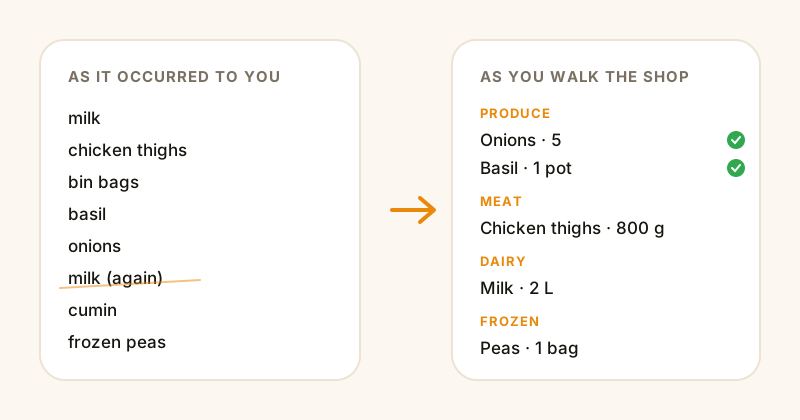
Most shopping lists are written in the order things occurred to you. Milk, chicken, bin bags, basil, more milk because you forgot you wrote it. Then you shop the list top to bottom and end up crossing the store four times, which is why a "quick shop" takes 50 minutes.
The fix is boring and enormously effective: write the list in the order you walk the shop.
Why aisle order beats every other sort
A supermarket has a fixed layout. You come in past the fruit and veg, work the perimeter for fresh things, cut through the middle for dry goods, and the freezers are at the end because frozen food shouldn't sit in your trolley for 40 minutes.
A list grouped by section maps onto that route. You clear a section, you move on, you never double back. Two things fall out of it for free:
- You stop forgetting things. Standing in the dairy aisle looking at all your dairy items at once is a much better prompt than a list where cheese is at position 3 and yoghurt at position 27.
- You stop buying duplicates. The classic third jar of cumin happens because the list didn't show you that cumin was already on it.
Alphabetical, by contrast, is a sort that serves nobody. No shop is laid out A-Z. It just feels organised.
The section order that works in most shops
Adjust for your local layout, but this order holds up nearly everywhere:
- Produce — fruit, veg, fresh herbs
- Bakery — bread, wraps, pastries
- Meat & fish
- Dairy & eggs — milk, butter, cheese, yoghurt
- Pantry — tins, pasta, rice, oil, spices, flour
- Frozen
- Household & other — cleaning, bin bags, toiletries
Put frozen last for the obvious reason. Put household last-ish because it's usually a single trip down one aisle and nothing melts.
Merging recipes is where the real time goes
The bigger win isn't the sorting — it's the merging.
Say you're cooking three things this week. A bolognese, a curry, and a Sunday roast. All three want onions. Two want garlic. Two want stock. If you write your list recipe by recipe, you end up with:
Bolognese: 2 onions, 3 cloves garlic, tin tomatoes, beef mince, stock
Curry: 1 onion, 4 cloves garlic, coconut milk, chicken thighs
Roast: 2 onions, potatoes, carrots, stock
Now you're in the veg aisle doing arithmetic. Five onions. Seven cloves — so one bulb. And you'll get it wrong at least once, because nobody wants to do addition while someone reaches past them for the shallots.
Merged and grouped, the same three recipes become:
PRODUCE
  Onions ....... 5
  Garlic ....... 1 bulb
  Potatoes ..... 1 kg
  Carrots ...... 6

MEAT
  Beef mince ... 500 g
  Chicken thighs 800 g

PANTRY
  Chopped tomatoes . 2 tins
  Coconut milk ..... 1 tin
  Stock cubes ...... 1 box
Same shop. A third of the thinking.
Doing it by hand
You don't need an app for this. A workable manual system:
- Keep a note with the seven section headings already typed out.
- When you pick your recipes for the week, add each ingredient under its heading rather than at the bottom.
- Add quantities as you go — if the item's already there, update the number instead of adding a second line.
- Keep a running "staples" section for the things you always check: milk, eggs, bin bags, coffee.
That's genuinely all it is. The catch is that it's about ten minutes of admin every week, and it's ten minutes of fiddly admin — the kind that gets skipped on a Sunday evening.
Doing it automatically
This is exactly the chore CookinBuddy was built to remove. You pick the recipes you want to cook, and it merges the ingredients into a single list, grouped by section, with the quantities already added up. Tick things off as you go and everyone you've shared the list with sees it update — which ends the "are you already at the shop?" phone call.
If your recipes are currently scattered across Instagram saves and screenshots, start with getting them into one place — the shopping list only writes itself once the recipes are actually structured data.
Small habits that make any list better
- Write quantities, not just items. "Cheese" tells you nothing at the counter.
- Note the form. Tinned or fresh tomatoes? Ground or whole cumin? This is the number one cause of a second trip.
- Keep a permanent staples list you glance at before leaving, rather than trying to remember what's running low.
- Check the fridge before you go, not after. Thirty seconds, saves a duplicate every time.
None of this is clever. It's just the difference between a shop that takes 20 minutes and one that takes an hour.