Cooking, 3 min read
How to cook from your phone without covering it in raw chicken
Screen timeouts, greasy fingers and scrolling back to find step four — the practical fixes for cooking from a phone, including hands-free step-by-step modes.
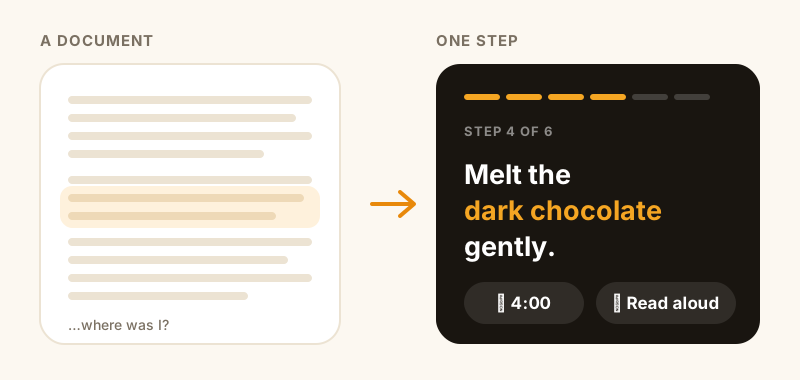
Cooking from a phone is a genuinely bad experience and we've all just accepted it. The screen locks every 30 seconds. You scroll with a knuckle. You lose your place in a wall of text and re-read the same paragraph three times. And at some point you touch it with chicken hands and quietly decide not to think about that.
Here's what actually helps, from the free fixes to the ones that need a different tool.
Stop the screen locking (free, do this first)
The single most annoying thing about cooking from a phone has a 20-second fix.
On iPhone: Settings → Display & Brightness → Auto-Lock → Never. Set it back to 30 seconds or a minute afterwards, or your battery will suffer.
There's a better version of this if you cook often: create a Shortcuts automation that sets Auto-Lock to Never when you open your recipe app, and back to normal when you close it. Ten minutes to set up, and you never think about it again.
Some recipe apps keep the screen awake automatically while you're in a cooking view — worth checking before you go changing system settings.
Get the text bigger than you think you need
You're not reading a phone at reading distance. It's propped against the kettle, a metre away, and you're glancing at it with a pan in one hand. Text that's comfortable on the sofa is unreadable across a counter.
Bump the system text size (Settings → Display & Brightness → Text Size), or use a recipe app whose cooking mode is designed to be read at a distance. This is one of those things that feels like a small detail and then completely changes the experience.
One step at a time beats a wall of text
The core problem with cooking from a recipe webpage is that it's a document. You're looking at 12 steps at once and constantly re-finding your place in them.
A step-by-step mode shows one step, large, with the ingredients for that step highlighted. You advance when you're ready. There's no scrolling, no losing your place, and no re-reading step three because you can't remember if you already did it.
If your recipe app doesn't have one, the poor man's version is to read the recipe fully before you start and set the phone aside — genuinely effective, and how everyone cooked before phones. But it requires the recipe to be simple enough to hold in your head.
Deal with the hands problem
The three options, honestly:
- Voice. "Hey Siri, next step" works if your app supports it, and having the step read aloud is even better — you don't have to look at all. This is the only genuinely hands-free option.
- The knuckle tap. Universal, works with most greasy hands, no setup. Not elegant but it's what most of us do.
- A stand and a clean-hands rule. Prop the phone up, decide that one hand stays clean, use that one. Works surprisingly well once it's a habit.
A screen protector and the willingness to wipe the phone down afterwards covers the rest.
Timers you don't have to set up
"Simmer for 20 minutes" means opening the clock app, typing 20, hitting start, and then forgetting which of your three running timers is the rice.
Better: timers embedded in the step itself, labelled with what they're for. If your app doesn't do that, at least name your timers in the clock app — "rice", "oven" — rather than running three anonymous countdowns and guessing.
What CookinBuddy does about it
This is the part of cooking we built the app's cooking mode around: one step at a time in text you can read from across the counter, the key ingredients highlighted in the step, timers built into the steps that need them, and the option to have it read aloud so you don't touch the phone at all.
It's free on iPhone. If your recipes are currently spread across screenshots and saved reels, start by getting them into one place — cooking mode only helps once the recipe is structured rather than a photo of a caption.
The five-minute setup
If you do nothing else:
- Turn off Auto-Lock before you start cooking.
- Increase the text size.
- Prop the phone up, out of splatter range.
- Read the whole recipe once before you turn the heat on.
- Name your timers.
That's most of the pain gone, and it costs nothing.